Home / Blog / Payments & Tax
Payments & TaxRazorpay for Restaurants: Accounts, KYC and Who Bears the Fee
What the Muncho payment account setup asks for, which documents to have ready, who bears the commission, and where the process still needs a hand.
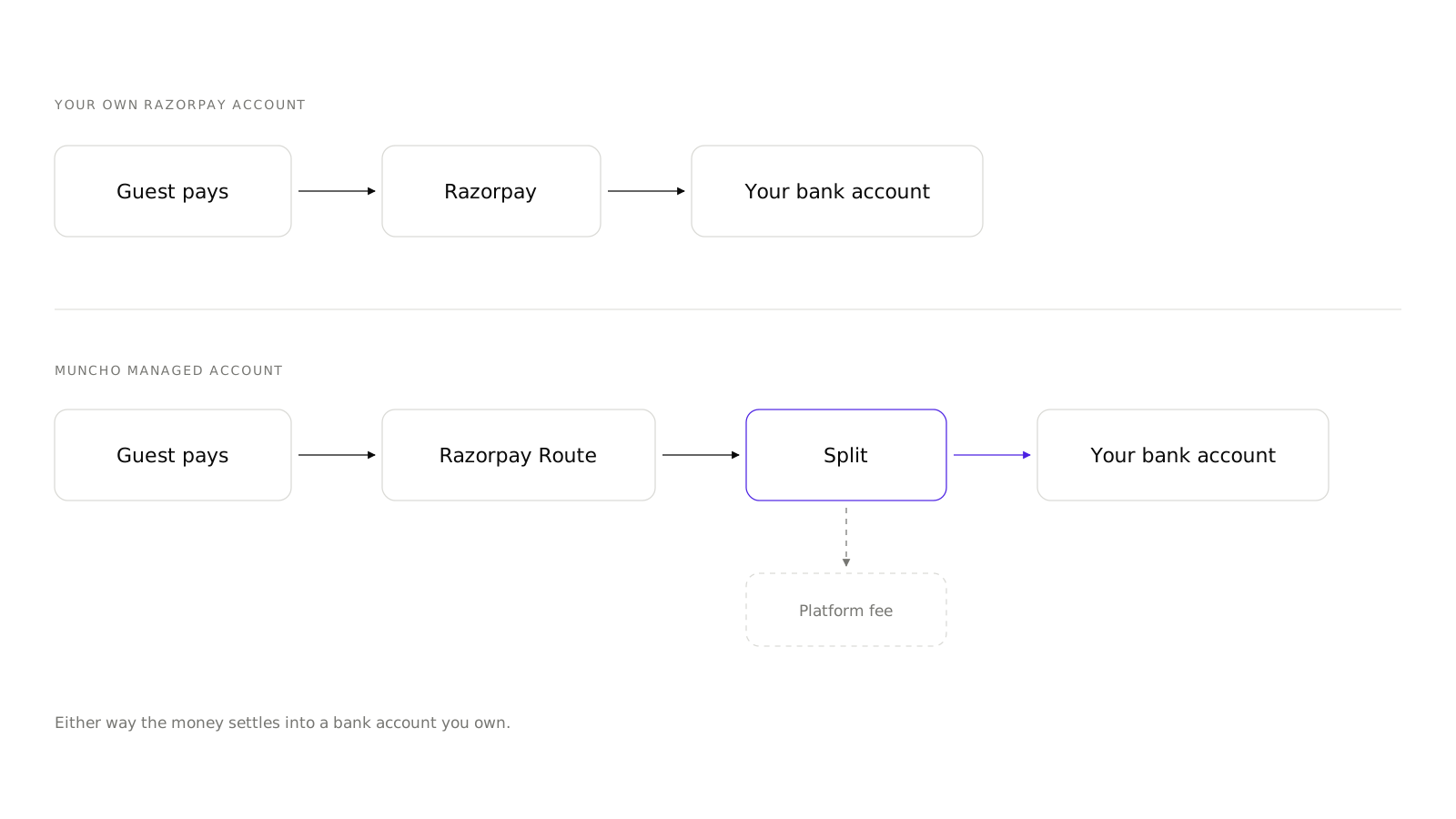
Guests pay through Razorpay, and before they can pay anything you need a payment account with completed KYC. Muncho's setup screen offers one route by default, a Muncho Managed Account created for you, and the money settles to your bank from Razorpay rather than from Muncho. Until that account is at least under review, the storefront will not take an order.
This post covers what the screens ask for, what to have ready, who pays the fee, and the one place in the process where you should expect to talk to a person.
Why payments come first
A fresh self-serve signup sees only AI Phone Calls in the sidebar. Everything else appears once a POS or Razorpay is connected. On the guest side, the storefront serves "Please Scan the QR Again" until payments are at least under review.
This catches people out, because it looks like a broken dashboard. It is not. It is the order of operations: payments and the POS first, then the channels.
What the setup screens ask for
There are four stages, and none of them take long. The waiting is the slow part, not the typing.
- The KYC screen. Titled "Welcome to Muncho", with a KYC Verification card, a "Why verify your account?" explainer and a Required Documents list: government photo ID, business registration certificate, bank account verification, address proof. It carries a Required Step badge and one button, Set Up Linked Account. The footer reads "Secured by Razorpay".
- Create Payment Account. Three groups of fields. Business Details wants a business name, a contact name, an email, a phone and a business type from Sole Proprietorship, Individual, Partnership, Private Limited, Public Limited and LLP. Address is next. Legal Information asks for PAN and GST, with the note "Use your personal PAN. GST is optional." There are no bank account fields on this form.
- Account activation. A status badge that moves through Pending Activation, Under Review, Needs Clarification and Activated, with three steps on screen: Check Your Email, Add Bank Account Details, and Verification and Activation. The page polls every twenty seconds.
- The dashboard banner, which reads "KYC is in progress!", then "Your KYC is completed" with "You are now live with Muncho!", or "KYC failed!" with a link to reattempt.
Have the PAN, the registration certificate, the address proof and the bank details in one folder before you start. The bank account is added at the activation stage, not on the form.
Where the process needs a hand
Be told this now rather than on a Friday night.
The self-serve activation of a Muncho-managed linked account does not always complete on its own. The flow can create the account and then park on "Complete Your Account Setup", pointing you at a Razorpay email that does not arrive for this type of account. A fix for it is written and not yet deployed.
If that happens to you, do not keep refreshing and do not create a second account. Contact the Muncho team and they will finish the activation from their side. The same conversation is how you get onto your own Razorpay account if you prefer to keep payments in an account you already hold; that route is real and in use, it just is not a button on this screen.
Nothing about this affects an account that is already activated. It is a setup-time step, and it takes a message rather than a workaround. If you have not started at all, create an account and get the KYC moving early, because the waiting is the part you cannot compress.
Who bears the fee?
You decide, per channel, and the guest sees the result.
Onboarding has a one-time "Configure Commission Charges" step with the explainer: Customer bears means the commission fee is added on top of the bill amount, Merchant bears means it is deducted from the payment you receive. Afterwards, the setting lives on the Commission card of each Settings page, where the two options are labelled Customer and You.
| Channel | Displayed rate | Code default |
|---|---|---|
| Dine-in | 2.1% | Merchant bears |
| Pay First | 2.1% | Merchant bears |
| Pickup | 2.1% | Merchant bears |
| Delivery | 5% | Merchant bears |
| Events | 2.1% | Customer bears |
| Cover Charge | 2.1% | Customer bears |
Those are the same figures the pricing page publishes. The practical advice: whichever you choose, tell your floor staff. A guest who notices an extra line asks the nearest person in an apron, not the owner.
If you are weighing these rates against what an aggregator takes, do the sum properly rather than comparing headline percentages. The method is in own delivery storefront vs Swiggy and Zomato, and the delivery page runs the same arithmetic in a small calculator.
What can guests pay with?
Whatever your Razorpay account has enabled. The storefront opens standard Razorpay Checkout without restricting methods, so UPI, cards, netbanking, wallets and EMI all appear if they are on in Razorpay.
There is no online cash or pay-at-counter option. The only payment chooser Muncho draws itself is the dine-in bill sheet, headed "Choose payment method", with Pay Direct for UPI and cards, and Others, which is an information sheet about aggregator vouchers rather than a payment route.
Cash, card and split exist for cover charges only, as a staff action: Mark as Paid, with the hint that UPI means showing the payment QR while cash, card or split means marking it paid after you collect.
How does the money reach your bank?
Razorpay settles it. Muncho does not hold your money and does not state a settlement timing anywhere in the product, so if you need to know whether it is next day or later, ask Razorpay for the schedule on your account.
Do not confuse this with the Settlement card in Dine-in Settings. That card is about who closes the bill in your POS, not about money reaching your bank. Manual means guests pay on Muncho and your staff settle the bill in the POS; Automatic means Muncho settles it for you, with the caveat that most discounted bills are still left for staff. It is explained in the PetPooja integration.
What about refunds?
There is no refund button for order or bill payments in the dashboard. If you need to refund a guest, that is a Razorpay dashboard action or a conversation with the Muncho team.
The single exception is a cover charge, which can be refunded in full: a Refund Payment button, then a dialog asking for the Refund Method from Cash, Online or UPI, Card and Other, plus a reason. There is no partial refund. See cover charge for pubs and clubs.
What to check once you are live
- Place a real order and pay for it from a phone, with a small amount, before you let guests anywhere near it.
- Check that the payment appears on the Payments page under Bill Payments, with the right type pill.
- Check what the POS did. At a manual-settlement venue the bill stays open after an online payment. That is expected, and your staff need to know it.
- Export a day. The Bill Payments CSV carries Payment ID, Type, Customer, Phone, Table or Pax, Receipt, Restaurant Amount, Method, Status and Paid Time. Export in short date windows, because the export runs over the records already loaded.
- Watch the first week's method mix. If almost everything is UPI, your commission conversation with guests is easier than you expected.
With payments live, the remaining setup is channel by channel: delivery charges and radius, pickup, and Dine-in Settings for the table.
Questions restaurants ask
Do I need my own Razorpay account to use Muncho?
Not to get started. The setup screen offers a Muncho Managed Account, which is created for you. Using your own Razorpay account is also supported, but you reach that route through the Muncho team rather than through a button in the dashboard.
What documents does the KYC ask for?
A government photo ID, a business registration certificate, bank account verification and address proof. The form itself asks for business details, an address, and legal information including PAN, with GST optional.
Why can guests not pay yet?
Until the payment account is at least under review, the storefront serves 'Please Scan the QR Again'. A fresh self-serve signup also sees only AI Phone Calls in the sidebar until a POS or payments is connected. Payments come first.
How long do settlements take?
Settlement of money is Razorpay's, not Muncho's, and Muncho does not state a timing anywhere. Ask Razorpay, and do not plan cash flow on a number you read on a blog.
Can I refund an order from the dashboard?
No. There is no refund button for order or bill payments. The only refund in the dashboard is for a cover charge, and it is full amount only.
Which payment methods can guests use?
The storefront opens standard Razorpay Checkout with no method restriction, so guests see whatever your Razorpay account has enabled: UPI, cards, netbanking, wallets and EMI. There is no pay-at-counter option online.
Run this on your own menu
QR ordering at the table, your own delivery and pickup storefront, and payments straight to your account. India plans: Plus Rs 11,999, Pro Rs 23,999, Max Rs 49,999 a year per outlet, plus GST. Usage comes from your wallet.