Home / Blog / Guides & Setup
Guides & SetupSetting Delivery Charges and a Delivery Radius That Pays
Fixed or per-kilometre, how far to deliver, free delivery thresholds, packaging, and the two things Muncho deliberately does not have.
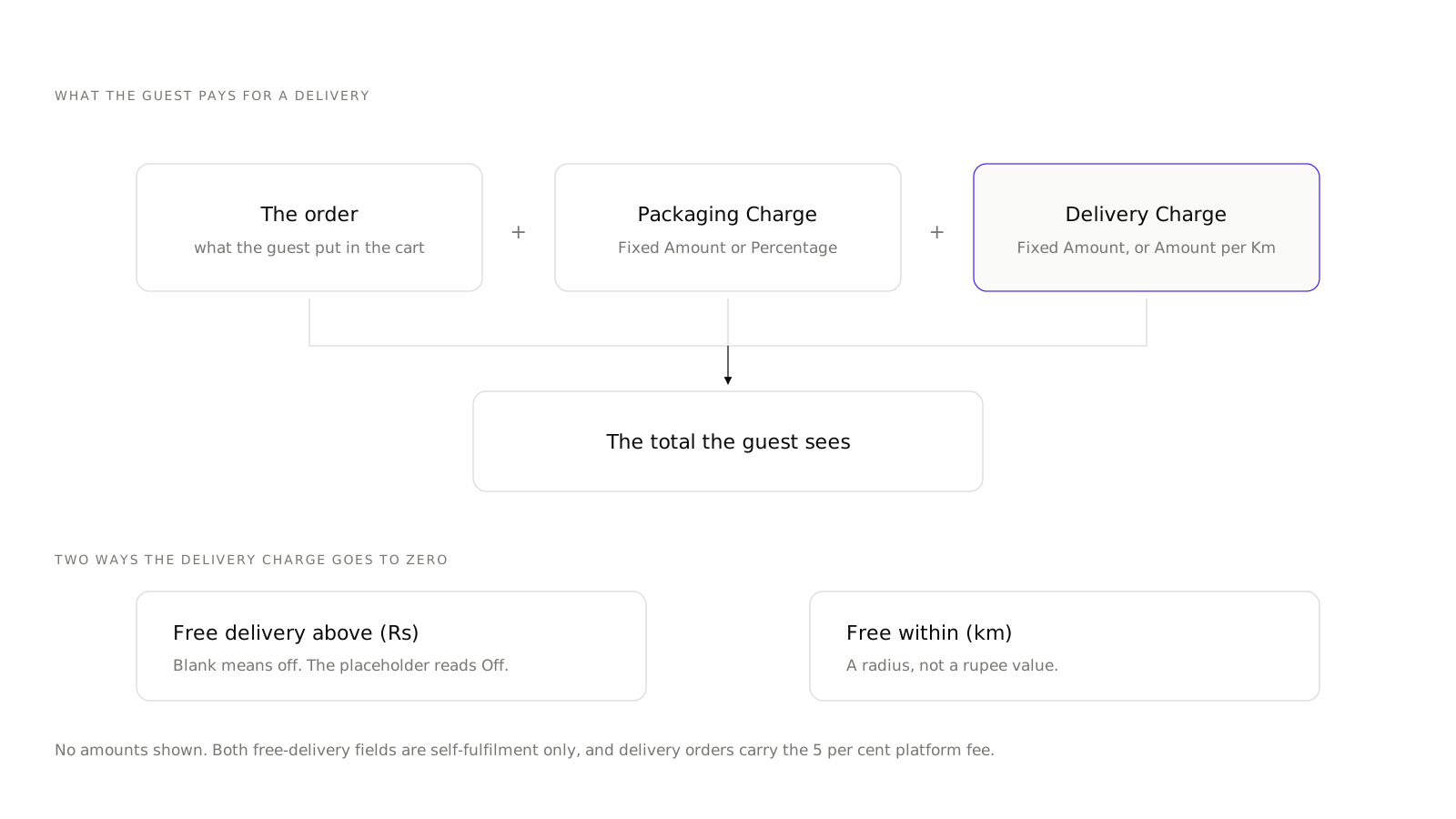
Delivery charges in Muncho are set on one card, on one page, with five fields. Fulfilment picks who delivers, Type picks fixed or per kilometre, an amount, a maximum distance, and two optional free-delivery thresholds. There are no zones and no minimum order value, so the radius and the charge carry the whole weight of your delivery economics.
That constraint is worth understanding before you set the numbers, because it changes how you set them.
Where do the settings live?
Delivery then Settings, with the page titled Delivery Settings. The equivalents are Pickup Settings and, before a delivery or pickup outlet exists, Online Order Settings.
The card is Delivery Charges, and within it the section is Delivery Charge.
- Fulfillment. Restaurant Staff or Shiprocket.
- Type. Fixed Amount or Dynamic, which is rupees per kilometre.
- Amount or Amount per Km. The label flips depending on Type.
- Max Distance (km). The radius.
- Free delivery above (₹), placeholder Off, self-fulfilment only.
- Free within (km), self-fulfilment only.
Below it on the same page: Packaging Charge, as Fixed Amount or Percentage, and for dine-in a Service Charge card.
Fixed or per kilometre?
Fixed is simpler for guests and easier to advertise. Per kilometre matches your cost more honestly and protects the edge of your radius, which is where delivery loses money.
A useful way to decide: work out your real cost to deliver at your maximum distance, including the rider's time back. If that number is more than double your cost at one kilometre, use Dynamic. If your radius is small and dense, use Fixed, because the difference is not worth the guest confusion.
Whichever you pick, set the amount against your cost and not against the aggregator's. The comparison a guest is making is between ordering from you and ordering from an app, and the app's delivery fee is subsidised by things you cannot match. The platform fee sits on top of your own cost either way: delivery orders carry 5 per cent, listed with every other channel rate on the pricing page.
How far should you deliver?
Max Distance is one radius, as the crow flies. There are no polygons, which means you cannot exclude the industrial estate on one side or extend along a road on the other.
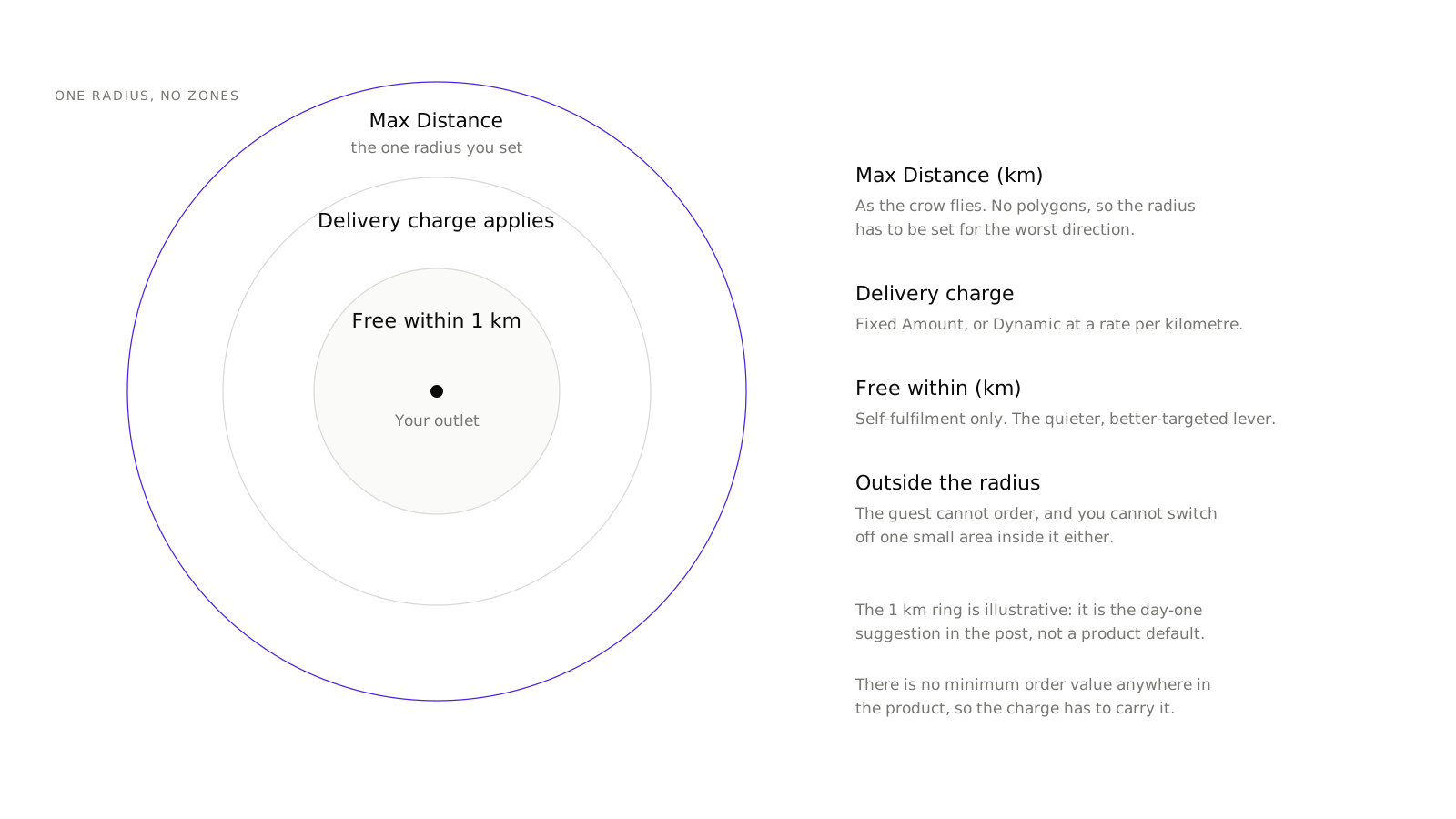
So the radius has to be set for the worst direction, not the average one. Take the direction with the heaviest traffic at your busiest hour and ask how far a rider can get and return within the time your food survives. That distance is your radius, even if you could go further to the north on a quiet Tuesday.
Two knock-on effects of having no zones:
- You cannot charge more for the difficult direction. Dynamic pricing by distance is the closest lever you have.
- You cannot switch off a small area. If one apartment complex is a problem, that is a conversation with your staff, not a setting.
Both of those judgements are easier with the page in front of you, so create an account and open Delivery Settings while you work through the numbers.
How should you use free delivery?
Both free-delivery fields are self-fulfilment only, and both are levers on average order value rather than on volume.
Free delivery above a rupee value is the classic one. Set it a little above your current average order value, not at it. If your average is 450, set it at 550 and watch what happens to the mix. Set it at 400 and you have given away the delivery charge on orders that were coming anyway.
Free within a kilometre radius is the quieter, better-targeted one. Deliveries within a kilometre cost you almost nothing, and making them free is a genuinely strong offer to the people most likely to become regulars.
Leave the amount blank to turn it off. The placeholder reads Off, so an empty field is not an unsaved field.
Who delivers?
Restaurant Staff. Your own people. Cheapest per order if they have slack time, expensive if they do not, and the only option where delivery quality is entirely yours.
Shiprocket. Genuinely live in Muncho, and the only logistics partner in the delivery product. There is no Dunzo, Porter or Borzo. You get routes, status-code mapping, a webhook, live rider location tracking, an AWB and courier name on the dashboard order, and a "Delivery Partner: Shiprocket" row plus a tracking link for the guest.
What there is not is a self-serve connect screen. Shiprocket is configured by the Muncho team during onboarding, and the stub page in the dashboard says so in its own words.
What happens when an order comes in?
- The order arrives on the Orders screen, under Upcoming or Pending. At PetPooja venues the Pending tab is hidden because orders default to Accepted.
- Staff accept it. Accepting a delivery order opens a dialog headed Accept Delivery Order with two mandatory fields, Minimum Preparation Time and Minimum Delivery Time, in minutes, then Accept Order. Those two numbers are what the guest sees as their wait, so do not make them optimistic.
- The kitchen makes it. At a POS venue the KOT is printed by the POS.
- Staff press Ready on the Accepted tab. At a PetPooja venue that button is labelled Capture Payment.
- The food goes out. With Shiprocket, their webhook drives out-for-delivery and delivered. With your own staff, someone marks those states from the waiter app.
The guest-facing wording is fixed: "Your order has been placed", "Your order is being prepared", "Your order is packed", "Out for delivery", "Order delivered".
One thing to plan around at PetPooja venues: no dispatched, out-for-delivery or delivered status ever comes back from PetPooja. Those states come from Shiprocket or from your staff.
What Muncho deliberately does not have
Say these out loud before you design a delivery offer around them.
- No delivery zones or polygons. One radius.
- No minimum order value. A guest can order one samosa to the edge of your radius. If that worries you, your delivery charge has to carry it.
- No saved guest addresses. The address lives inside the order, and the browser copy is wiped on every page load, so a repeat customer types it again every time. It is the single most requested thing on the delivery side and it is not there yet.
- No refund button for an order payment in the dashboard. Refunds are a Razorpay job, as covered in Razorpay for restaurants.
What to set on day one
- Fulfillment: Restaurant Staff, unless onboarding has set up Shiprocket for you.
- Type: Fixed, if your radius is under about four kilometres. Dynamic beyond that.
- Amount: your real cost to deliver at your average distance, rounded up.
- Max Distance: the honest worst-direction number, not the best-case one.
- Free delivery above: blank for the first month. Turn it on once you know your average order value from the Analytics page.
- Free within: one kilometre, if your own staff deliver.
- Packaging Charge: whatever it actually costs you.
Then order from your own link, to your own address, and see the total a guest sees. It is remarkable how often that is the moment somebody notices the charge is wrong.
The rest of the online ordering setup is in pickup and takeaway, and the argument for running your own channel at all is worked through in own delivery storefront vs Swiggy and Zomato.
Questions restaurants ask
Can I draw delivery zones on a map?
No. There are no zones or polygons. Serviceability is one radius set by Max Distance, or a Shiprocket quote if Shiprocket is doing the delivery.
Can I set a minimum order value for delivery?
No. There is no minimum order value in the product. The only minimum that exists is on a coupon, which can require a minimum order value before it applies.
What is the difference between Fixed Amount and Dynamic?
Fixed Amount charges the same delivery fee on every order. Dynamic charges per kilometre, and the Amount field changes to Amount per Km when you pick it.
How do I offer free delivery?
Two fields, available only when your own staff fulfil the order: Free delivery above, in rupees, and Free within, in kilometres. Leave the first blank to switch it off; the placeholder reads Off.
Do I need Shiprocket?
Only if you do not have staff who can deliver. Shiprocket is live in Muncho with rider tracking, an AWB and a courier name on the order, and a tracking link for the guest, but it is configured by the Muncho team during onboarding.
Run this on your own menu
QR ordering at the table, your own delivery and pickup storefront, and payments straight to your account. India plans: Plus Rs 11,999, Pro Rs 23,999, Max Rs 49,999 a year per outlet, plus GST. Usage comes from your wallet.
Related reading
 Guides & Setup
What Is Scan and Pay? Settling a Restaurant Bill From the Table
Scan and pay lets a guest scan the table code, land straight on the printed bill and settle it. Here is how it works and when it does not.
 Guides & Setup
Cover Charge for Pubs and Clubs: Pricing, Redemption, Reporting
How to price a cover charge by day, collect it at the door, redeem it against the bill, and read the redeemed versus non-redeemed split the next morning.
 Guides & Setup
Pickup and Takeaway Ordering: Setting Up a Storefront
Takeaway is pickup, one channel. How the pickup storefront works, what to set on the Pickup Settings page, and where to put the link.