Home / Blog / Restaurant Operations
Restaurant OperationsWhat WhatsApp Messages Your Guests Actually Get From Muncho
The exact list of WhatsApp messages Muncho sends a guest, why every one is a template, and the things it does not send that people assume it does.

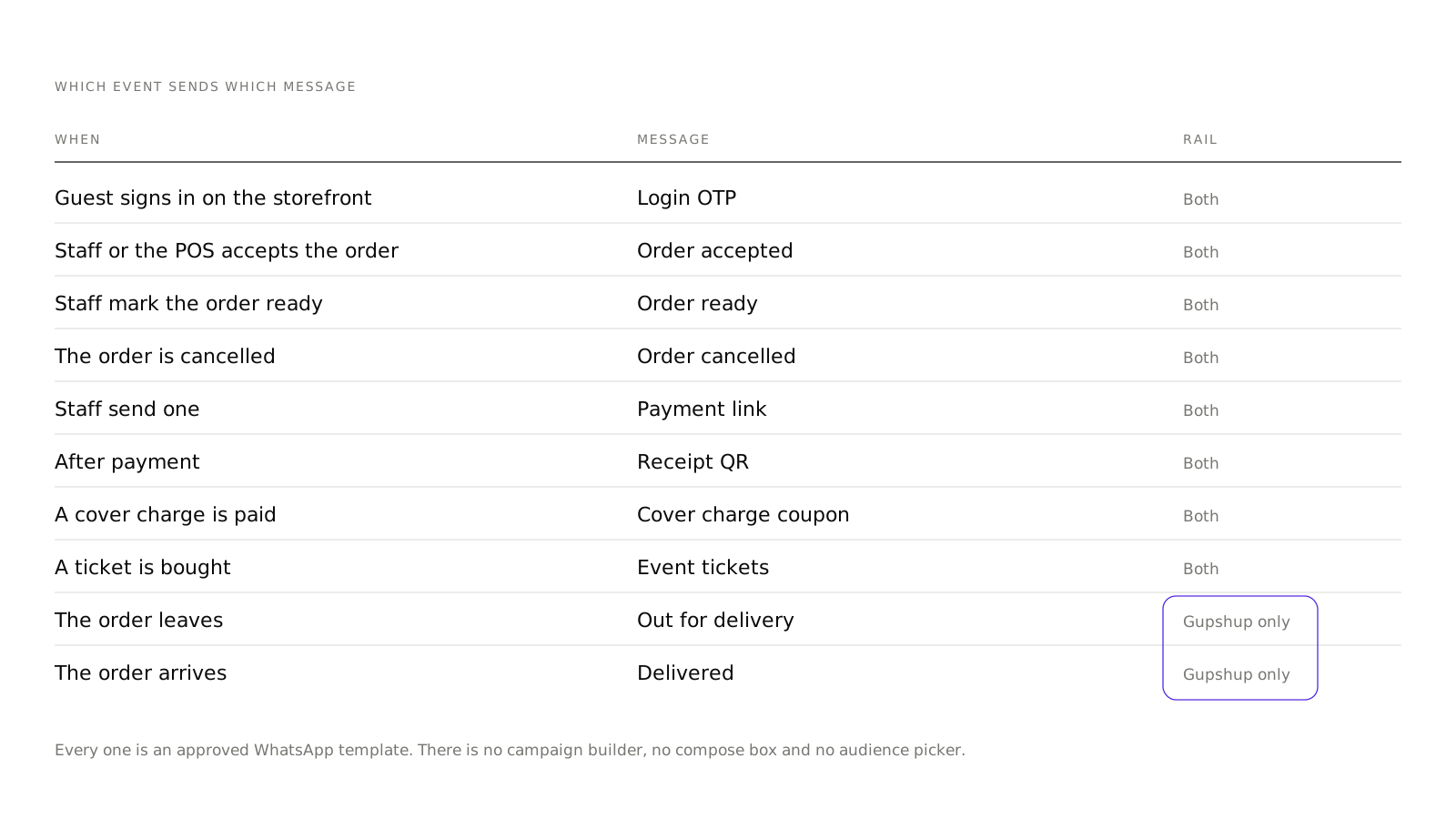
Muncho sends a short, fixed list of WhatsApp messages to guests, all of them transactional, all of them approved templates: the login OTP, order accepted, order ready, order cancelled, a payment link, a receipt QR, a cover charge coupon and event tickets. It does not send marketing. There is no campaign builder, no compose box and no audience picker anywhere in the dashboard.
If you are planning your guest communications, plan against that list rather than against what a restaurant technology page implies.
Which messages does a guest actually receive?
| Message | When | On which rail |
|---|---|---|
| Login OTP | Guest signs in on the storefront | Both |
| Order accepted | Staff or the POS accepts the order | Both |
| Order ready | Staff mark the order ready | Both |
| Order cancelled | The order is cancelled | Both |
| Payment link | Staff send one | Both |
| Receipt QR | After payment | Both |
| Cover charge coupon | A cover charge is paid | Both |
| Event tickets | A ticket is bought | Both |
| Out for delivery | The order leaves | Gupshup only |
| Delivered | The order arrives | Gupshup only |
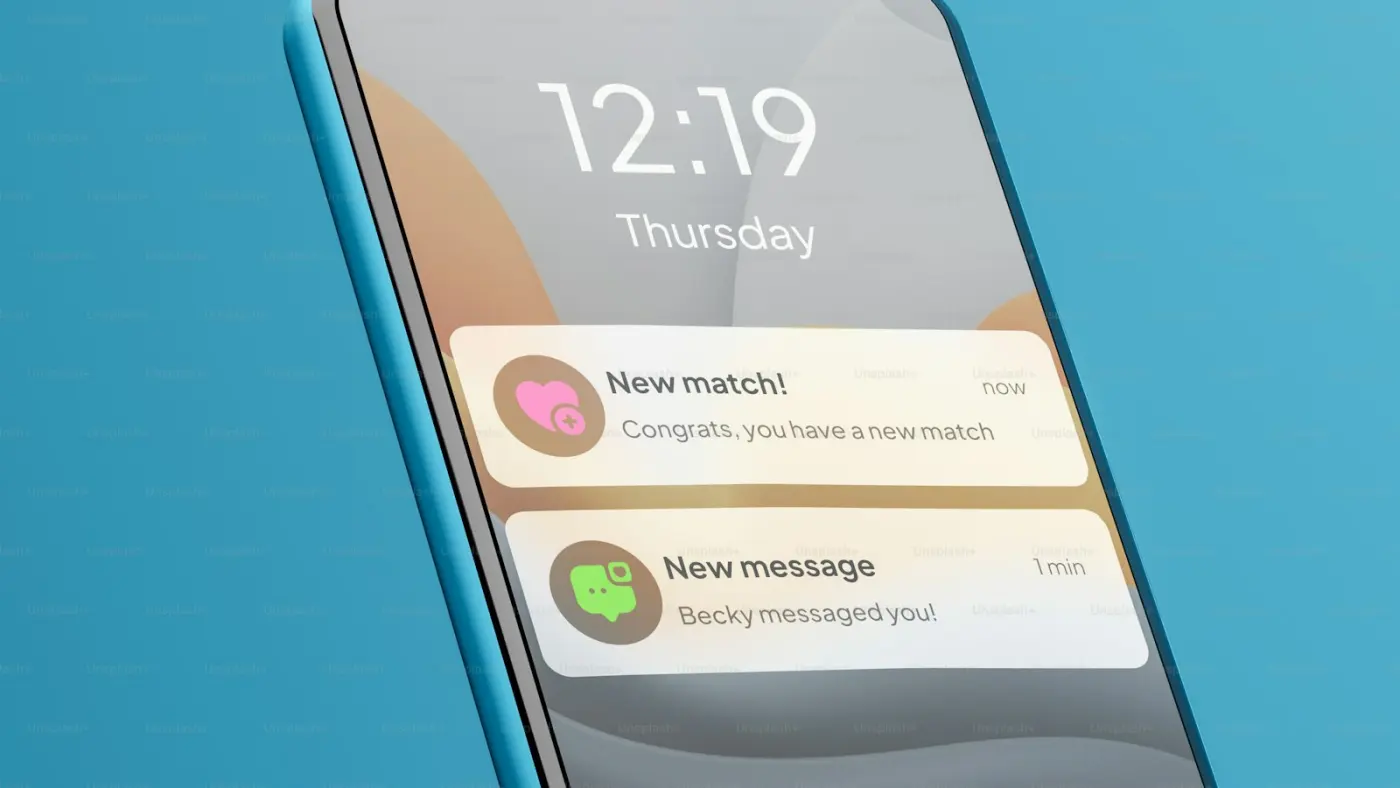
That is the list. Nothing on it is optional marketing, and nothing on it needs you to write anything.
Why is every message a template?
Because WhatsApp requires it for business-initiated messages. An approved template has fixed wording with variable slots, and it is reviewed before it can be used.
This is not a Muncho limitation you can argue your way past. It is the rule for the channel, and it is the reason your guest gets a well-formed order update instead of whatever somebody typed at 11pm.
The practical consequence for you: the wording of these messages is not editable from your dashboard. Changing it means changing a template, which is a conversation rather than a text field.
Which sender do your messages come from?
Two rails, and which one you are on changes what guests see.
TrustSignal, on a shared Muncho sender. The default for everything transactional. It works immediately and needs nothing from you. The trade is that the message does not come from your restaurant's own WhatsApp number.
Gupshup, per restaurant. For venues that bring their own WhatsApp Business account. It sits inert until it is configured, and once it is, guests see your number. It also carries two extra templates the shared rail does not: out for delivery, and delivered.
If your delivery guests keep phoning to ask where the food is, the Gupshup rail is the answer to that question, and getting on it means getting your own WhatsApp Business account set up. If you are not live yet, create an account and check which rail you are on by ordering from yourself.
What Muncho does not send
This is the more useful half of the post, because most disappointment comes from assuming one of these exists.
No campaigns or broadcasts. There is no compose screen, no audience picker and no send button in the dashboard. If you want to message your customer list, you export it from the Customers page and message them from whatever you already use. The only thing labelled Campaigns in the sidebar is inside AI Phone Calls, and that is outbound voice, not WhatsApp.
No review requests. Muncho does not message a guest asking for a Google review. The review invite is an in-app redirect after payment, and it only fires for guests who rated you four stars or more. That flow is worth setting up properly and is covered in Google reviews from a QR order.
No abandoned cart messages you can rely on. A three-nudge cart recovery at ten minutes, one hour and twenty-four hours is built, suppressed once an order is placed, and sent over Gupshup. It sits behind a switch and needs a configured Gupshup venue. Do not plan a promotion around it until you have confirmed with the Muncho team that it is running for you.
No delivery confirmation to you. Delivery receipts are built and not merged, so today nobody can confirm that a guest received a given message. If a guest says they got nothing, that is currently a claim you cannot check.
What can you do with your guest list instead?
Export it and use it deliberately.
The Customers section has Overview, All Customers and Reviews. All Customers gives you Table, Type as Dine In, Delivery or Takeaway, Date and Time, Customer Names, Phone Numbers, Payment, Total and Tip, with a date range filter, a search box, and an Export to Excel capped at 10,000 rows.
Two honest caveats before you build anything on it. It is one row per order, not a deduplicated customer record, so the same person appears many times. And there is no tagging feature, so segments have to be built in the spreadsheet, not in the dashboard.
The Overview page is more useful for reading than for exporting: a 7, 30, 90 day or 1 year selector, cards for Total Customers, New vs Repeat, Avg Customer Value and Total Revenue, and panels for New vs Returning Customers, Peak Hours, Busiest Days, Most Popular Items, Customer Segments, By Order Type and Top Customers. There is a CSV export for top customers and a chosen segment.
How should you think about guest messaging today?
Treat WhatsApp as the reliable rail for the things that must arrive, and treat everything promotional as a human job for now.
The transactional messages carry real operational weight. An order-ready message is the difference between a guest who collects on time and a guest standing at a counter. A cover charge coupon lives in WhatsApp precisely because it has to survive a loud night on somebody's phone, which is exactly what cover charge depends on.
For anything else, the honest advice is to build the habit manually. Export the list monthly, message the people who came twice and not a third time, and keep a note of what you said. When a campaign tool does arrive, you will have a list and a habit rather than a tool and no idea what to say.
What to check
- Order something yourself and read every message the guest gets, in order.
- Check whose number it came from. If you expected your own, you are on the shared rail.
- Ask about Gupshup if you run delivery and want out-for-delivery and delivered messages.
- Do not promise guests a message that is not on the list above.
The rest of the guest-facing flow is in QR code ordering and, if you run your own delivery, pickup and takeaway.
Questions restaurants ask
Can I send a WhatsApp campaign to my customers from Muncho?
No. There is no campaign or broadcast builder anywhere in the dashboard: no compose screen, no audience picker, no send button. The only thing labelled Campaigns is inside AI Phone Calls, which is the voice product.
Can I write my own message text?
No. Every send is an approved WhatsApp template. Free text is not possible on this rail, which is a WhatsApp rule rather than a Muncho choice.
Does Muncho ask guests for a Google review over WhatsApp?
No. There is no review-request message. The Google review invite is an in-app redirect after payment, and only for guests who rate four stars or more.
Can I use my own WhatsApp Business number?
Yes, through Gupshup, configured per restaurant. The default is a shared Muncho sender on TrustSignal. The Gupshup rail also carries out-for-delivery and delivered messages that the shared rail does not.
Can I see whether a guest received the message?
Not today. Delivery receipts are built but not merged, so nobody can currently confirm a guest received a message.
Run this on your own menu
QR ordering at the table, your own delivery and pickup storefront, and payments straight to your account. India plans: Plus Rs 11,999, Pro Rs 23,999, Max Rs 49,999 a year per outlet, plus GST. Usage comes from your wallet.
Related reading
 Restaurant Operations
Which Numbers a Restaurant Owner Should Read Every Monday
A fifteen minute Monday routine across Analytics, Orders, Payments and Customers, and the limits of each screen before you trust it.
 Restaurant Operations
An AI Phone Agent for Your Restaurant: What It Can and Cannot Do
What the AI Phone Calls section in Muncho actually does today, what it costs, who in your team should have access, and what it does not handle.
 Restaurant Operations
Getting Google Reviews From a QR Order, Without Nagging Guests
How the review prompt works after a guest pays, why only four-star ratings reach Google, and what to do with the feedback that stays in-house.