Home / Blog / Restaurant Operations
Restaurant OperationsGetting Google Reviews From a QR Order, Without Nagging Guests
How the review prompt works after a guest pays, why only four-star ratings reach Google, and what to do with the feedback that stays in-house.

Muncho asks for a review at the one moment a guest is most likely to give one: immediately after they pay, on the phone they just paid with. A modal opens, the guest taps stars, and what happens next depends on the rating. Four stars or above and the guest is redirected to your Google page. Below four and the feedback stays with you.
That split is the whole design, and it is worth setting up properly because it costs nothing extra and most restaurants never configure the Google link at all.
What does the guest see?
A modal, straight after payment, headed "Share your experience at {your restaurant}" with the line "Click on the stars to leave a review."

The guest taps a rating. Then the modal asks "Can you tell us more?" and offers a Submit Review button.
That is it. No email capture, no second screen, no follow-up message. The whole thing is over in about eight seconds, which is why it gets answered.
How does the Google redirect work?
Only a guest who rated four stars or above is redirected to your Google URL. Below four, the feedback is stored in your dashboard and goes nowhere else.
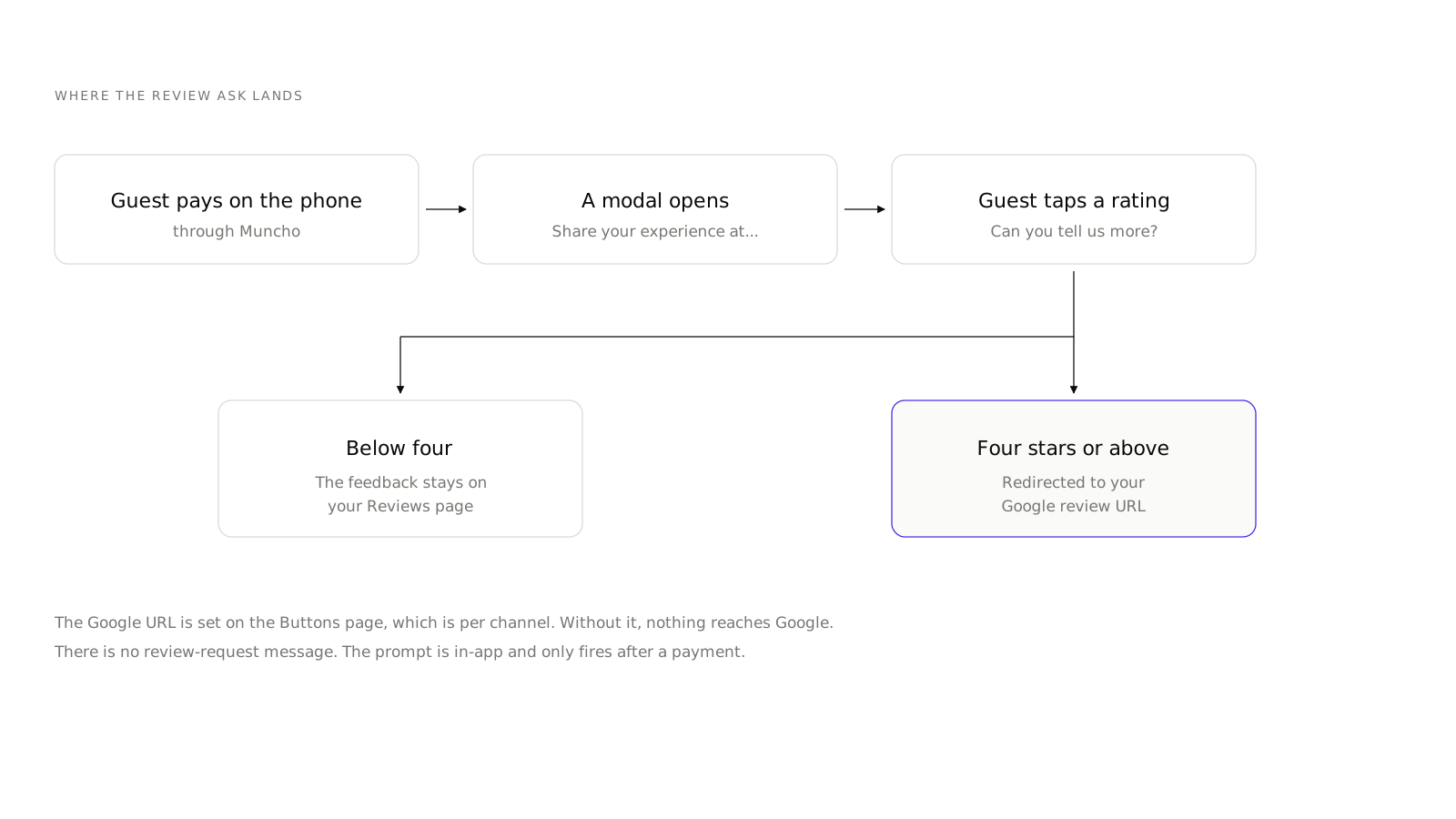
The Google URL is set on the Buttons page, which is per channel like everything else in the sidebar. If you have never opened that page, there is nothing to redirect to, and your happy guests are giving you a five-star rating that only you can see.
Setting it is a two-minute job and it is the single highest-return thing on this page.
Where do I find my Google review link?
Open your Google Business profile, find the option to ask customers for reviews, and copy the short link it gives you. It looks like a g.page address with a review suffix. Paste that into the Buttons page for each channel that has guests paying through Muncho.
Test it on your own phone before you rely on it. If you have not set a venue up yet, you can sign up and get the Buttons page right before the first code goes on a table. A link that opens the wrong location of a two-outlet business is a mistake that takes months to notice.
What happens to the ratings below four?
They land on the Reviews page in the dashboard, under Customers.
The page has cards for Overall, Food, Service and Ambience, a count chart, and a table of Customer, Date, Overall, Food, Service, Ambience and Comment, with search. There is no export.
Those four sub-scores are more useful than the overall number. An overall three that is Food five and Service one is a staffing problem on a specific shift. An overall three that is Food two across the board is a kitchen problem. The dashboard will not tell you which, but the table will if you read it weekly.
Read it with the date and the table number in hand. A run of low service scores between eight and ten on Saturdays is a rota question, not a hospitality philosophy question.
Is the four-star gate fair?
It is worth being clear-eyed about this, because the mechanic has a name and a reputation.
What the gate does is decide who gets a nudge towards Google. It does not stop anybody leaving a review: a guest who wants to write about a bad meal on Google can do so at any time, from their own phone, without your help. Nothing here is blocking them.
What it avoids is the clumsier alternative, which is redirecting every single guest to Google regardless of how the evening went. That treats your public rating as a numbers game and it tends to backfire.
The honest framing for your staff: happy guests get a fast route to saying so in public, unhappy guests get a private route to telling you first. Whether you then act on the private route is the part that actually determines your rating over a year.
Why is there no review-request message?
Because there is no review-request WhatsApp template in Muncho. The full list of what a guest receives is in what WhatsApp messages your guests actually get, and review requests are not on it.
This is a real constraint, not an oversight to work around. If you want a follow-up ask a day later, that is something a person does from your own WhatsApp, using the customer list exported from the Customers page. The one automated outbound channel in the product is the AI phone agent, and that is voice rather than messaging.
For most restaurants the in-app prompt at payment does the work anyway, because the timing is better than any follow-up. The guest is still at the table, still in a good mood, and has their phone in their hand.
What raises the number of reviews you get?
Four things, in order of effect.
- Set the Google URL. Without it, none of this reaches Google.
- Get more guests paying through Muncho. The prompt fires after payment, so a venue where most guests pay at the till sees few prompts. Scan and pay is the lever here, and it comes with the dine-in setup rather than as an extra.
- Fix the service problems the private feedback shows you. This is slow and it is the only one that moves your average rating rather than your review count.
- Tell your staff it exists. A server who says "if you had a good time, the review prompt after you pay takes ten seconds" doubles the response rate more reliably than anything in software.
What to do this week
- Open the Buttons page for every channel and paste in your Google review link.
- Pay a real bill on your own phone and go through the whole prompt, including the Google redirect.
- Open the Reviews page and read the last month by sub-score, not by overall.
- Pick the one recurring complaint and fix it.
Then leave it alone for a month. Review counts move slowly, and the thing to watch is whether your Food and Service scores diverge, not whether you gained four reviews this week. The other numbers worth a weekly look are in which numbers to check every Monday.
Questions restaurants ask
When does a guest get asked for a review?
Right after payment. A modal opens headed 'Share your experience at' your restaurant name, with stars, then 'Can you tell us more?' and a Submit Review button.
Do all reviews go to Google?
No. Only a guest who rates four stars or above is redirected to your Google URL. Below four, the feedback stays in your dashboard.
Where do I set the Google link?
On the Buttons page for the channel. That is where the Google review URL lives.
Does Muncho message guests asking for a review?
No. There is no review-request WhatsApp message. The only prompt is the in-app modal after payment.
Can I export my reviews?
No. The Reviews page has cards, a chart and a searchable table, but no export.
Run this on your own menu
QR ordering at the table, your own delivery and pickup storefront, and payments straight to your account. India plans: Plus Rs 11,999, Pro Rs 23,999, Max Rs 49,999 a year per outlet, plus GST. Usage comes from your wallet.
Related reading
 Restaurant Operations
Which Numbers a Restaurant Owner Should Read Every Monday
A fifteen minute Monday routine across Analytics, Orders, Payments and Customers, and the limits of each screen before you trust it.
 Restaurant Operations
An AI Phone Agent for Your Restaurant: What It Can and Cannot Do
What the AI Phone Calls section in Muncho actually does today, what it costs, who in your team should have access, and what it does not handle.
 Restaurant Operations
What WhatsApp Messages Your Guests Actually Get From Muncho
The exact list of WhatsApp messages Muncho sends a guest, why every one is a template, and the things it does not send that people assume it does.