Home / Blog / Restaurant Operations
Restaurant OperationsGuest Song Requests and the DJ Console: Running Music Sanely
How guests request songs from the table, what the DJ console shows, how votes work, and what to decide before you switch the music on.

Guests request songs from a card on the dine-in menu headed PLAYING NOW, which shows the current track and a Request a Song button. Requests arrive in a DJ console with vote counts and table labels, where your DJ marks them played or removes them. It is dine-in only, the guest has to be logged in, and there is no dashboard switch to turn it off.
Nobody else in Indian restaurant technology writes about this, which is odd, because in a pub it is the feature guests notice first.
What does a guest see?
On the dine-in menu home there is a card headed PLAYING NOW with the track that is playing and a Request a Song button. That is the whole guest interface.
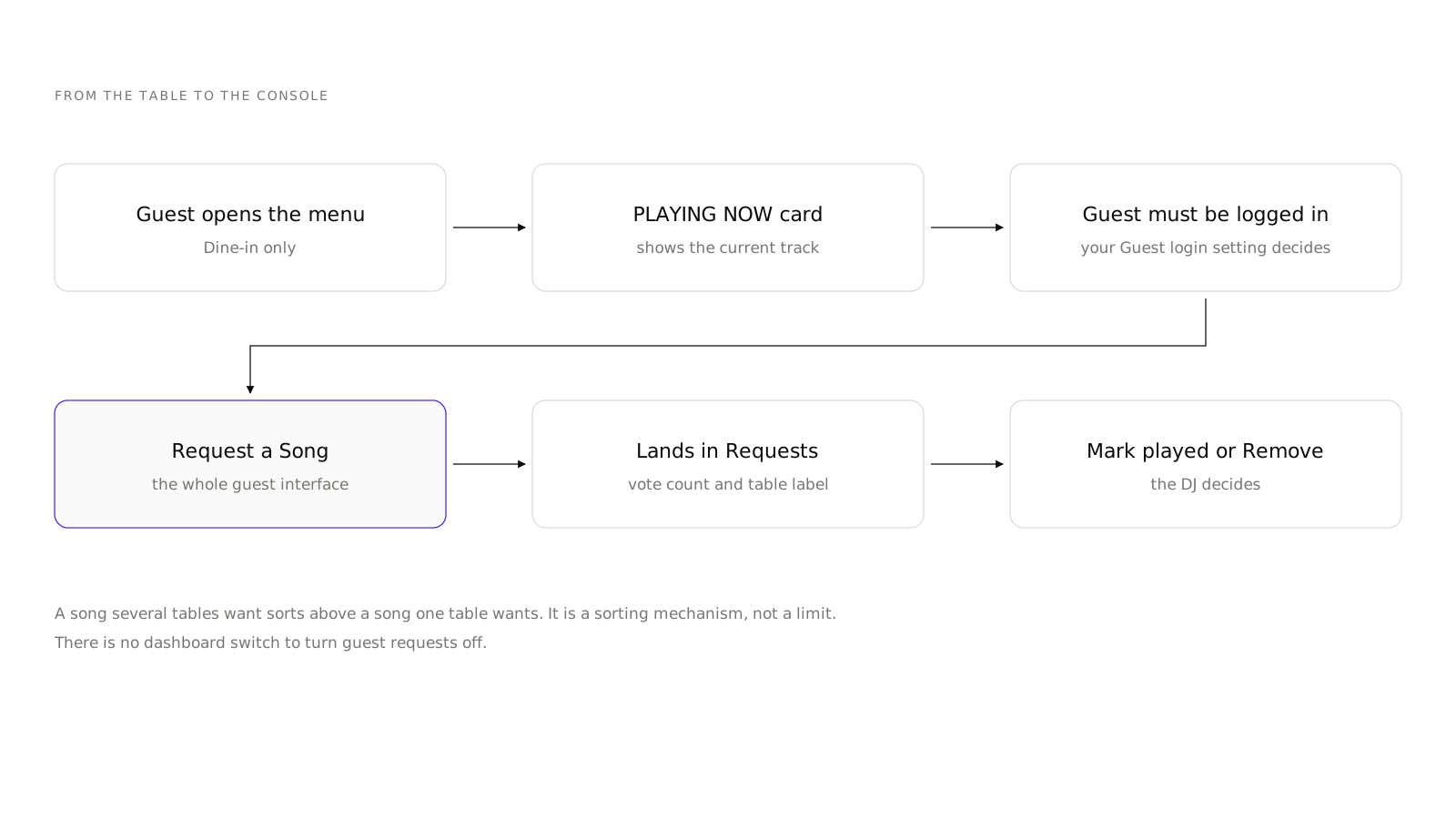
Two conditions. It is dine-in only, so a delivery or pickup guest never sees it. And the guest must be logged in, which means your Guest login setting decides how much friction sits in front of a request.
That second point is worth thinking about. If Guest login is set to phone number with OTP, a guest who just wants to hear a song has to verify a phone number first. Some venues consider that a feature, because it turns a request into a customer record. Others find it kills the fun. Either way it is a deliberate choice, not an accident.
What does the venue side look like?
Two pages under Music in the sidebar.
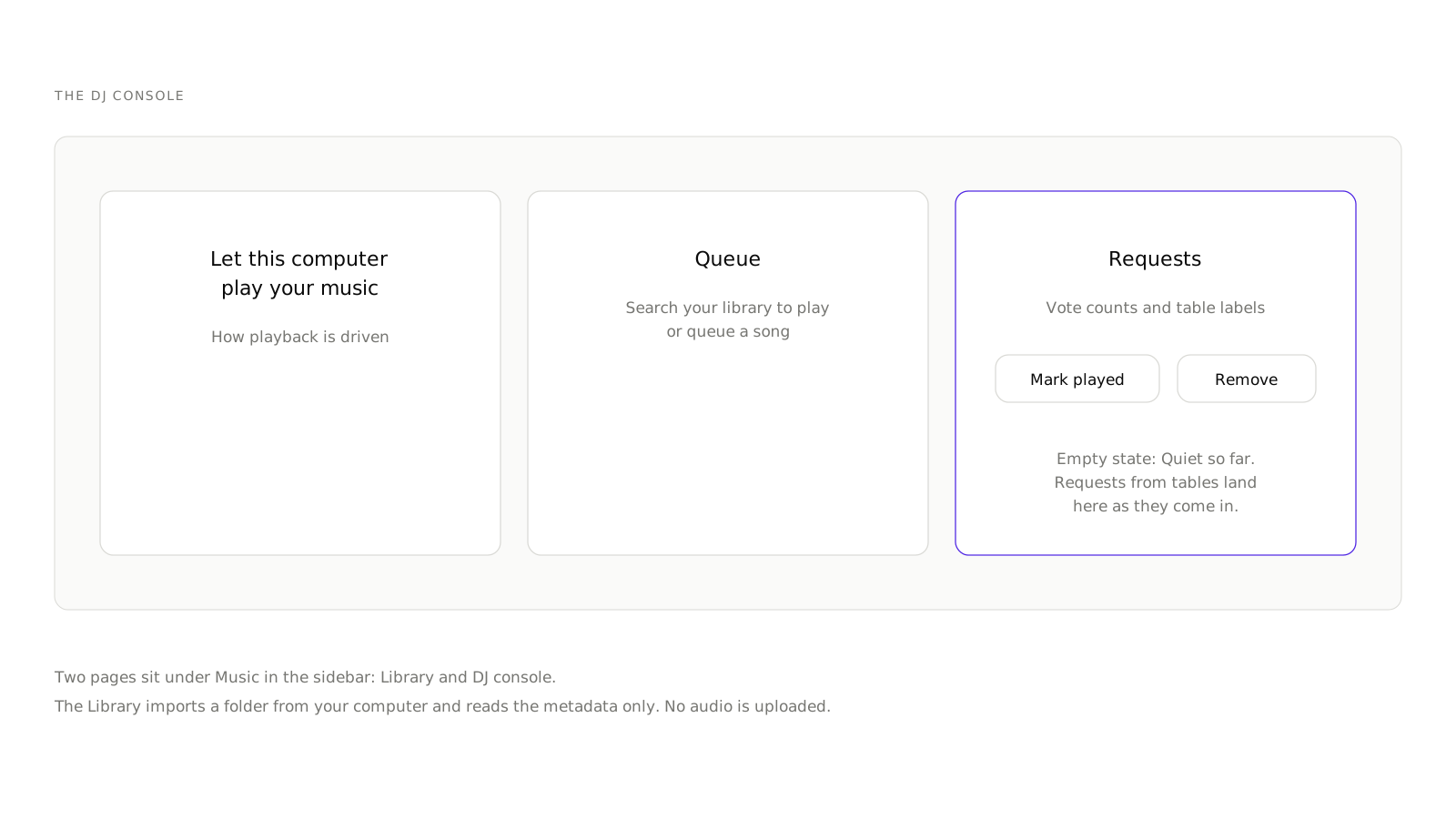
Library. Offers "Add your music folder", a browser folder import that reads metadata only. No audio is uploaded anywhere. The other half of the page is "What guests can browse", which is the set guests can request from.
DJ console. Three parts:
- "Let this computer play your music", which is how playback is driven.
- Queue, described as "Search your library to play or queue a song".
- Requests, showing vote counts and table labels, with Mark played and Remove on each. Its empty state reads "Quiet so far. Requests from tables land here as they come in."
If you are still deciding, create an account and get the dine-in side running first, because the music card only matters once guests are already scanning.
The table label is the detail that makes this work operationally. A DJ who can see that table 14 asked is a DJ who can nod at table 14, and that small thing is most of the value.
How do votes change the room?
A request carries a vote count, so a track several tables want sorts above one that a single table wants.
This turns the request list from a first-come queue into a rough read of the room. On a Saturday it stops one enthusiastic group from setting the entire playlist. On a quiet Tuesday it does not do much, because there is nobody to outvote anyone.
It is a sorting mechanism, not a limit. A DJ can still play whatever they want, and should. The list is information, not an instruction.
What should you decide before switching it on?
Who owns the queue. If your DJ believes the requests list is a demand, you will have a bad night. Brief them that it is a signal. The Remove button exists for a reason.
What is in the library. Guests can only request what you have imported and made browsable. A thin library produces the same six requests all night. A library with everything in it produces requests that do not fit your room.
When it runs. There is no schedule for it in the dashboard. If you do not want requests during dinner service and do want them after ten, that is a human decision the DJ enforces by removing requests, not a setting.
Whether you want it at all. This is the one to settle early, because there is currently no dashboard switch. Turning guest song requests off requires a database change, so it is a message to the Muncho team rather than a toggle you can find at 9pm on a Friday. Decide before the codes go out.
How does it sit with the rest of the table experience?
Song requests share a surface with everything else the guest does from the table, which is the point.
The same scan that gets a guest a menu gets them the music card, the Waiter button and eventually the bill. From the guest's side there is one thing to learn, not four.
From your side, the requests land in the DJ console while the waiter requests land in the waiter app. They are separate lists for separate people, which is right: your DJ should not be reading requests for cutlery.
Is it worth running?
For a pub, a club or a bar with a resident DJ, yes, and for a reason that has nothing to do with music. Music is included in Pro, alongside the dine-in tools. It gives a guest a reason to open the menu again between drinks, and a guest with the menu open orders more than a guest with a phone in their pocket.
For a restaurant with background music and no DJ, no. The PLAYING NOW card implies an attentiveness you are not going to deliver, and a request that never gets played is worse than no request button.
For an events venue, it depends on the night. A ticketed event with a booked artist should not be taking requests. A regular Friday should.
What to do first
- Import a library that fits your room and nothing else. Resist putting everything in.
- Check what guests can browse. That list is the promise you are making.
- Log in as a guest from a table and request a song. See it arrive in the console.
- Brief the DJ on Mark played and Remove, and on the fact that votes are advice.
- Watch one night before you promote it.
Everything else on the dine-in surface is in Dine-in Settings, and if your Friday nights also carry a door charge, cover charge for pubs and clubs is the companion piece.
Questions restaurants ask
How does a guest request a song?
From the dine-in menu home, on a card headed PLAYING NOW showing the current track with a Request a Song button. It is dine-in only, and the guest has to be logged in.
Do I have to upload my music?
No. The Music library imports a folder from your computer and reads the metadata only. No audio is uploaded.
How do I turn song requests off?
There is no dashboard switch for it today. Turning guest requests off is a database change, so it is a request to the Muncho team rather than a setting you can find.
Can a DJ see which table asked?
Yes. The Requests panel shows vote counts and table labels, with Mark played and Remove on each.
What stops one table flooding the list?
Votes. Requests carry a count, so a song several tables want rises above a song one table wants. It is a sorting mechanism, not a hard limit.
Run this on your own menu
QR ordering at the table, your own delivery and pickup storefront, and payments straight to your account. India plans: Plus Rs 11,999, Pro Rs 23,999, Max Rs 49,999 a year per outlet, plus GST. Usage comes from your wallet.
Related reading
 Restaurant Operations
Which Numbers a Restaurant Owner Should Read Every Monday
A fifteen minute Monday routine across Analytics, Orders, Payments and Customers, and the limits of each screen before you trust it.
 Restaurant Operations
An AI Phone Agent for Your Restaurant: What It Can and Cannot Do
What the AI Phone Calls section in Muncho actually does today, what it costs, who in your team should have access, and what it does not handle.
 Restaurant Operations
Getting Google Reviews From a QR Order, Without Nagging Guests
How the review prompt works after a guest pays, why only four-star ratings reach Google, and what to do with the feedback that stays in-house.